Tell the Cruise Manager directly and early when a traveler does not want operator images used for marketing. That is the practical answer for a Paradise photo and video opt-out. The exact Paradise vessel, sailing, package, account and crew instruction must be checked before a passenger acts.
Paradise’s current terms say clients may inform the Cruise Manager, who will try to exclude them from images; this is not a promise that every incidental image can be removed. For a Paradise photo and video opt-out, use the current voucher, live program, reception record and crew direction rather than a price, activity or instruction remembered from another cruise.
Quick decision
- Vessel: for a Paradise photo and video opt-out, confirm Paradise Elegance, Grand, Legacy, Delight or the actual assigned vessel.
- Sailing: for a Paradise photo and video opt-out, check the live itinerary and any crew update.
- Record: for a Paradise photo and video opt-out, preserve the voucher, account entry, receipt or safety notice.
- Authority: for a Paradise photo and video opt-out, reception controls the account and crew controls onboard safety.
- Fallback: for a Paradise photo and video opt-out, prepare for unavailable activities, failed payment or a safety stop.
Start with the exact vessel and package
A Paradise brand reference alone is not enough for a Paradise photo and video opt-out. Different vessels, stops, promotions and sailing programs can change inclusions and operating details. Ask staff to name the product and show where the relevant inclusion, charge or instruction appears.
Practical procedure
- Step 1: make the request at boarding.
- Step 2: identify all affected travelers.
- Step 3: ask staff to note the preference.
- Step 4: avoid posing for operator media.
- Step 5: repeat the request before group filming.
- Step 6: use the published privacy contact for concerns.
Keep an itemized record
An itemized record should identify the cabin, passenger, service or item, time, currency and payment status when relevant. Review entries while the crew can still trace them. Keep a final receipt after any correction.

Prices and availability for a Paradise photo and video opt-out may change. The article therefore does not freeze a menu, treatment, excursion, tax, tip or upgrade figure. Ask for the current amount before authorizing a purchase and never describe a pending card attempt as completed payment.
Payment and connectivity fallback
Paradise currently describes cash in USD or VND and several international card brands for onboard purchases, but a Paradise photo and video opt-out still needs a sailing-specific confirmation. Bay connectivity can be unstable, and card authorization may depend on the network and issuer.
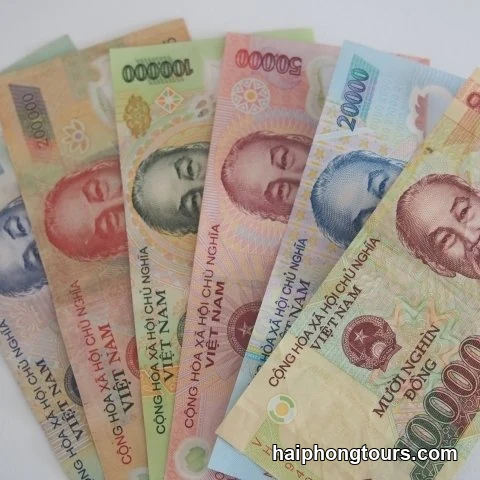
Carry a reasonable approved fallback and avoid repeated card attempts that might create duplicate pending transactions. Ask reception what succeeded, obtain evidence of the settled method and keep payment details private.
Safety instructions take priority
No payment, activity or convenience decision about a Paradise photo and video opt-out overrides the captain or crew. Attend the boarding briefing, follow current weather and authority restrictions, use required safety equipment and stop an activity when instructed.
Hai Phong Tours treats a Paradise photo and video opt-out as a verification decision, not as authority over Paradise’s account, payment processor, medical response or vessel safety. The crew’s current instruction applies onboard, especially when conditions change.
If the expected option fails
If an image is later identified, contact the operator with the date, sailing and image location while limiting unnecessary personal data. This is the practical failure branch for a Paradise photo and video opt-out. Ask staff to document the result where money, property, access or a later follow-up may be involved.
Do not improvise safety instructions for a Paradise photo and video opt-out, force an unavailable activity, promise connectivity or argue about cost during an urgent response. Protect people first, then collect the account, incident or service record needed for review.
Questions to confirm onboard
Keep the response for a Paradise photo and video opt-out proportional to the issue. An account question belongs with reception; an activity or emergency question belongs with the responsible crew. If language is a barrier, request a written amount, location or instruction and point to the relevant line rather than pretending to understand.
Before checkout or disembarkation
- Paradise Cruise Photo and Video Opt-Out vessel check: exact vessel, sailing and live program.
- Paradise Cruise Photo and Video Opt-Out inclusion check: prepaid package versus optional item.
- Paradise Cruise Photo and Video Opt-Out account check: itemized entries, corrections and payment proof.
- Paradise Cruise Photo and Video Opt-Out safety check: briefing, equipment and latest crew direction.
- Paradise Cruise Photo and Video Opt-Out follow-up check: responsible contact and supporting record.
Paradise Cruise Photo and Video Opt-Out is easiest to manage before the final checkout queue. Verify the current vessel facts, ask before authorizing extras, review the account and follow crew safety instructions without relying on a generic promise.
Useful guides for your trip
Need help choosing the cruise or coordinating the shore transfer? Contact us with your date, preferred route, group size and starting point. Tell us about any dietary, mobility or onward-connection needs before booking.